Monday, December 20, 2010

Posted by melissaulbricht on Dec 13, ...

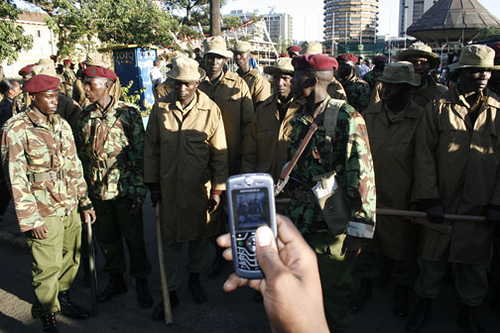
Mobile Media: How to record quality video on your mobile phone
Posted by melissaulbricht on Dec 13, 2010

Many mobile phones can capture video footage. This has enabled both trained journalists and citizen reporters to more easily capture footage including images that were rarely seen before. The Polk Journalism Award in 2009, for example, was awarded to a video from Iran captured on a mobile phone. Today, more and more journalists are using mobile phones to record video and quickly transfer content to their newsrooms via mobile data connections. 

Using mobiles to capture video isn't new news. But there is good news: You don't need a high-quality video camera to do high-quality reporting, be you in the U.S. or elsewhere. Many journalists and citizen reporters today use smartphones to capture video footage. Examples abound. Vancouver journalism students use an iPhone with some additional hardware and software to do all their video editing on the phone. Voices of Africa uses a Nokia N-series smartphone. In his book Mobile Journalism in the Asian Region, Stephen Quinn uses both iPhones and Nokia smartphones. This post will provide some tips and tools on how you can record quality video and audio from your mobile phone.  more....


From the above guides, we have summarized the top five tips for video recording on mobile phones. 

First, camera stability is key.  If you have a tripod, use it. If not, work on a steady grip and a stable sitting or kneeling position (here are some tips). Avoid jerky movements, and pan as slowly as possible. External hardware may help with this.

Second, use an external microphone if at all possible. Mobile phone microphones are built for call-quality audio, which is not ideal --  especially when you are shooting from a distance. More tips onrecording audio on mobiles are available.

Third, think carefully about lighting. It is best to film outside in sunlight, but make sure to keep the sun behind the back of the person filming. If you are filming inside, be sure to use many lights to fill the subject from all sides. Low resolution videos look the best when there is plentiful light.

If you need to pan, pan slowly to avoid jerkiness in the video. Most mobile phone video cameras do not have a digital zoom, but if yours does, it is best not to use the zoom. It is better to walk closer to the subject being filmed.

Finally, if you are not going to upload the video directly from your handset, use the highest resolution and quality settings offered. You can compress the video on your computer later. If you are uploading video directly from your handset, you may want lower quality video so you get a smaller file size.

Prabhas Pokharel contributed research and writing. Photo courtesy of flickr user DEMOSH. 


Saturday, December 18, 2010

US Army testing solar powered tents f...

US Army testing solar powered tents for troops, gadget addicted campers

While the military is still hashing out plans to outfit soldiers with their own smartphones, gadgets are already a part of daily life of troops in the field. Of course, more technology means more demand for power, and the Army has been evaluating technologies for flexible, lightweight photovoltaic tents and shades. "They are ideal for charging up batteries, making sure your (communications), night vision goggles and computers are powered up. You don't want a generator on top of a mountain, and you don't want to have to bring fuel to a generator or haul batteries," said assistant secretary of the Army Katherine Hammack. Among the various items being tested are the TEMPER Fly, a roughly 16-by-20-foot tent able to generate 800 watts of electricity; QUADrant, a smaller version of the TEMPER Fly that generates roughly 200 watts of power; and Power Shades capable of generating up to 3 kilowatts of exportable electrical power. Sounds like a kick-ass tent for next year's festival season!

Friday, December 17, 2010

Garmin Powers Whereis iPhone App in A...

Garmin Powers Whereis iPhone App in Australia


Garmin Powers Whereis iPhone App in Australia
Australia wireless operator Telstra announced today Whereis Navigator, an iPhone application powered by Garmin that is free to download for Telstra Next G subscribers with compatible iPhone 3, iPhone 3GS and iPhone 4 handsets. 

The application uses off-board Australian maps from Sensis and data usage is free for basic features (that do not include turn-by-turn navigation). A monthly subscription fee applies (AU$9.95) for access to the premium features that include navigation as well as live traffic alerts (by Australian Traffic Network), fuel prices and real-time flight schedule. 

The application also offers text to speech, lane guidance and weather forecasts. 

Whereis Navigator is the first unveiling of an iPhone navigation app by Garmin. But the company has been working with Telstra since 2008 to offer turn-by-turn navigation for a number of operating systems, including Blackberry and Android. 

Garmin Powers Whereis iPhone App in Australia

Thursday, December 16, 2010

Casio Exilim EX-H20G (with Hybrid GPS...

Casio Exilim EX-H20G (with Hybrid GPS) camera review

Three months from introduction to on sale ain't too shabby in the camera world, and that's exactly what Casio has managed to accomplish with the intriguing new Exilim EX-H20G. We first spotted this point-and-shoot atPhotokina in Germany, and now we've had a solid week to put it through its paces. Naturally, the inclusion ofHybrid GPS (read: engineered to find a location indoors as well as outdoors) is the standout feature and key differentiator, but the 14.1 megapixel sensor, 10x optical zoom and 720p movie mode are all fine additions. It certainly isn't the slimmest compact on the market, nor the cheapest at $349.99, but do the unique aspects of this thing make the price easier to stand? Join us after the break for our thoughts.

GV™3.0

GV™3.0

GV™3.0 is an imagery viewer and metadata editor that supports read, write, and display of National Imagery Transmission Format (NITF 1.1, 2.0, 2.1), NATO Secondary Imagery Format (NSIF), NSIF/BIIF/NITFS Preferred JPEG 2000 Encoding (NPJE), streaming JPEG2000, Advanced Authoring Format (AAF), MPEG, JPEG, GIF, PNG, GeoTIFF and multi/hyperspectral formats.


For more information on the GV™3.0 imagery viewer, contact us.

http://gv30.org/index_gv.html

Wednesday, December 15, 2010

Google App Inventor Leaves Private Be...

Google App Inventor Leaves Private Beta, Now Open To Everyone

imageRemember Google App Inventor, a Google Labs project that lets people without programming experience create Android apps for personal use? It is an interesting project, but so far, it has only been available as a private beta, which meant you needed an invitation to get in. According to the App Inventor team, their experiment has generated more interest than they had ever hoped for, with people creating apps ranging from vocabularies and SMS to marriage proposals.

To unlock the full potential, Google is now opening up App Inventor to anyone with a Google account – just head over...

Official Android Police t-shirts are now on sale, with over 25 designs to call yours. Discount coupons also available.


Motorola Android 3.0 Honeycomb Tablet...

Motorola Android 3.0 Honeycomb Tablet photos and specifications emerge

More clear photos and specifications have emerged on Motorola’s upcoming Honeycomb Tablet. These new photos and specifications are the courtesy of well-known Verizon leaker WN Russell, confirming that it is the same android tablet that Google VP Andy Rubin showed off at the launch of the Google Nexus S. Currently this tablet has no name but different reports are suggesting different names which includes, MotoPad, Everest, Stingray and Trygon. According to leak, this 10-inch tablet will be based on Android 3.0 codenamed Honeycomb and will be powered by dual-core NVIDIA Tegra 2 chipset, clocking in at 1GHz with 512MB of RAM.

It is expected that this Motorola’s Honeycomb tablet will make appearance at CSE event which is to be held on 5th January 2011 as Verizon branded. Why Verizon? Because if you look closely in the photos you will see a Verizon logo imprint on the top of the tablet. However stay tuned and we’ll let you know if anything comes up. Check out its specifications and photo gallery below.

Specifications of Motorola Honeycomb Tablet

Android Honeycomb OS, a dual-core NVIDIA Tegra 2 (T20) processor, 512MB of RAM, rear-facing 5 mega-pixel camera with flash, front-facing 2 mega-pixel camera, A 1280×800 display resolution, 32GB of built-in flash, micro USB, Wi-Fi, Bluetoothmini HDMI and 3.5 mm headphone jack.

New Photos of Motorola’s Honeycomb Tablet

[via]